NewIntroducing Memo AI — Turn voice notes into structured insights→
Mem Is Shutting Down: How to Move Your Notes to NotePlan (and Keep Your AI)
Mem shuts down on January 15, 2027. Export your Mem notes as Markdown, import them into NotePlan, and connect Claude or ChatGPT to your notes.
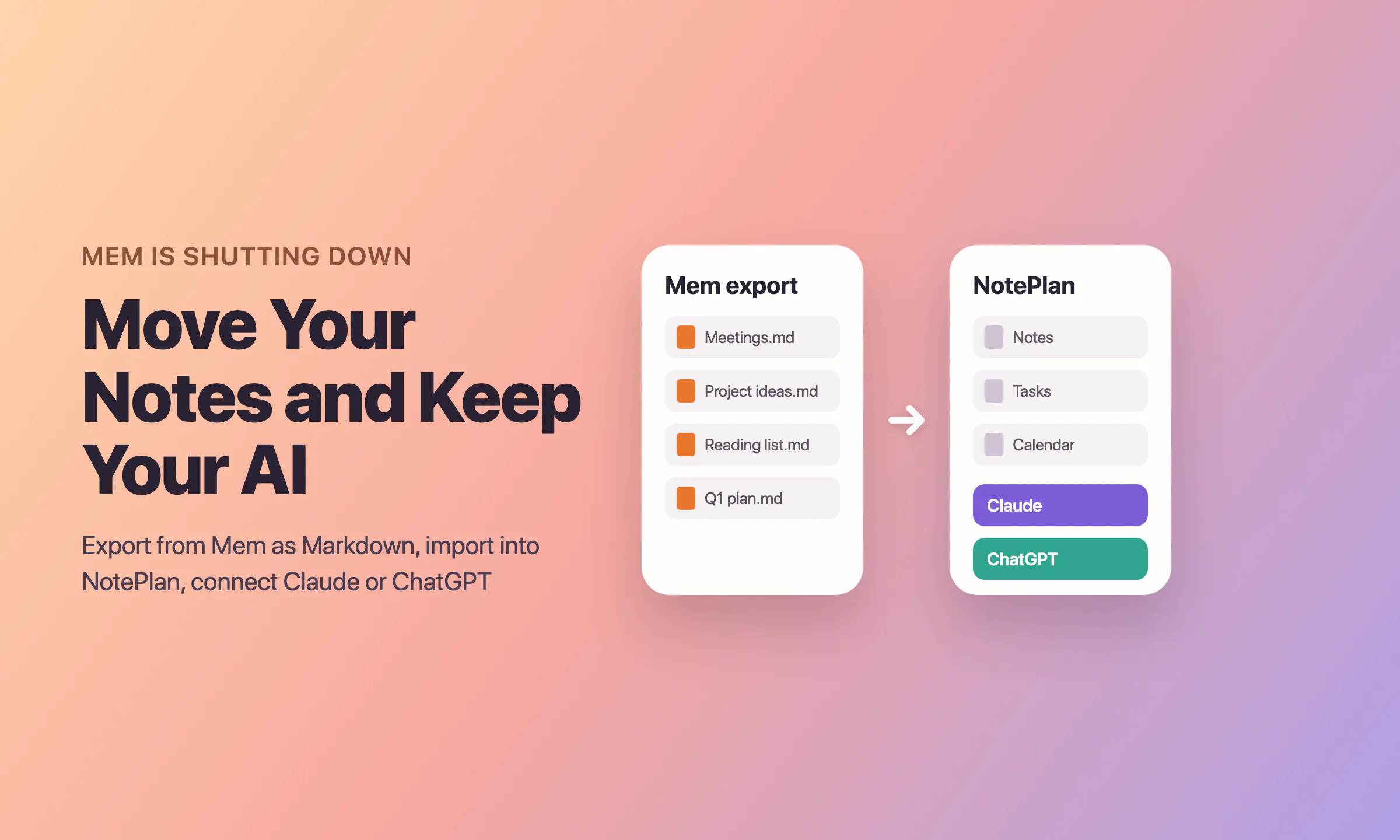
Mem is shutting down. Your notes become read-only on December 18, 2026, and Mem closes on January 15, 2027. Export your notes before then: Mem gives you a ZIP file of Markdown notes, and NotePlan imports Markdown files directly. To keep an AI that knows your notes, connect Claude or ChatGPT to NotePlan through its MCP connector.
This guide shows each step, what to check after the move, and how your Mem habits map to NotePlan. If you used Mem every day, losing it is a real loss. The goal here is a calm and complete move.
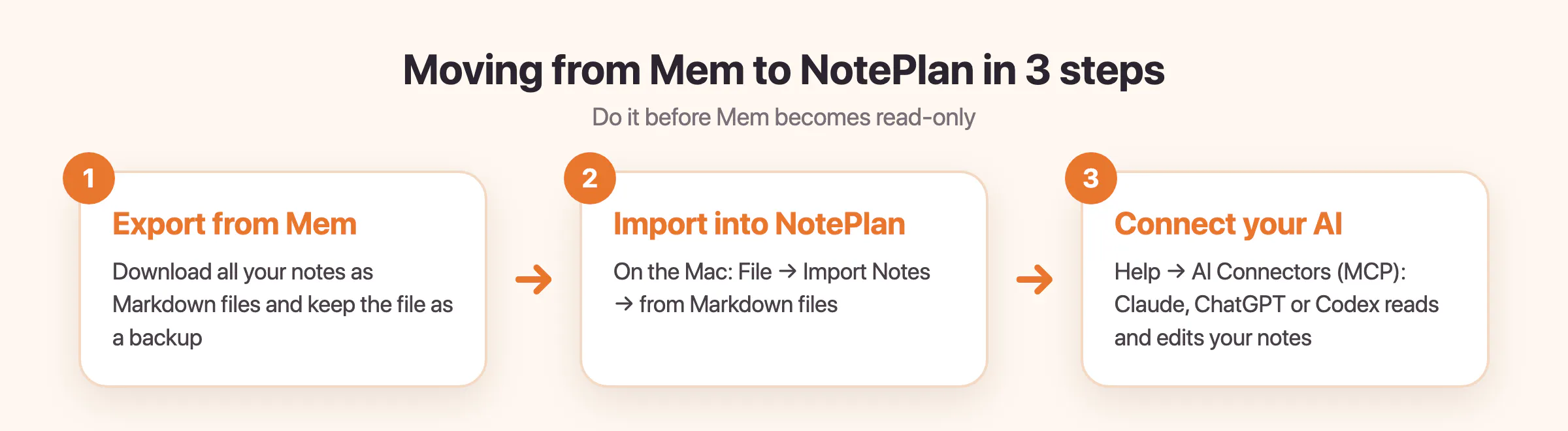
The move takes three steps: export from Mem, import into NotePlan, connect your AI.
What happens to Mem and when
Mem explains the shutdown in its announcement and in its migration guide. These are the dates and facts from Mem's own pages:
- December 18, 2026: notes become read-only. You cannot create or edit notes, but you can still sign in, read and export them.
- January 15, 2027: Mem shuts down. After this date you cannot open Mem.
- Billing: Mem has stopped charging, so you will not be billed again. Paid features stay available until the end.
The announcement does not say what happens to the data on Mem's servers after the shutdown. Do not wait for that answer. Save your own copy now.
Step 1: Export your notes from Mem
The export runs on a computer. Mem describes it on its help page Save a copy on your computer:
- Sign in to Mem on a computer and open Settings > Exports.
- Click Start new export.
- Choose My Computer as the destination, then click Next.
- Check the options. If you want the audio of recorded meetings, select the audio recordings option now. Transcripts are included by default where they exist.
- Click Start export. Large libraries take some time.
- Go back to Exports and click Download when the export is ready.
- Save the ZIP file and unpack it. On a Mac, double-click the file.
What is in the Mem export
- notes/: one Markdown (.md) file for each note.
- collections/: one index file for each collection, with links to its notes. A note in two collections shows up in both indexes.
- attachments/: the files that your notes refer to, such as images and PDFs. Keep this folder next to the others so that the relative links keep working.
- export-report.md: only there if Mem could not include some items. Open it first if something seems missing.
Mem's help pages do not describe the exact format of links between notes, frontmatter or file names. Open a few files in a text editor before you import, so you know what you have.
Tip: export early, and keep the original ZIP as a backup until you have checked everything in NotePlan. If you edit notes in Mem after your first export, export again to get the changes.
Step 2: Import the Markdown into NotePlan
NotePlan has no special Mem importer, and it does not need one. Mem gives you Markdown files, and NotePlan reads Markdown files. NotePlan also saves your notes as plain-text Markdown files, so your notes stay portable after the move.
On the Mac
- Open NotePlan.
- In the menu bar, choose File > Import Notes… > from Markdown files.
- Select the unpacked Mem folder, or only its notes folder. You can also select single .md or .txt files.
- Wait until the import is complete, then open a few notes.
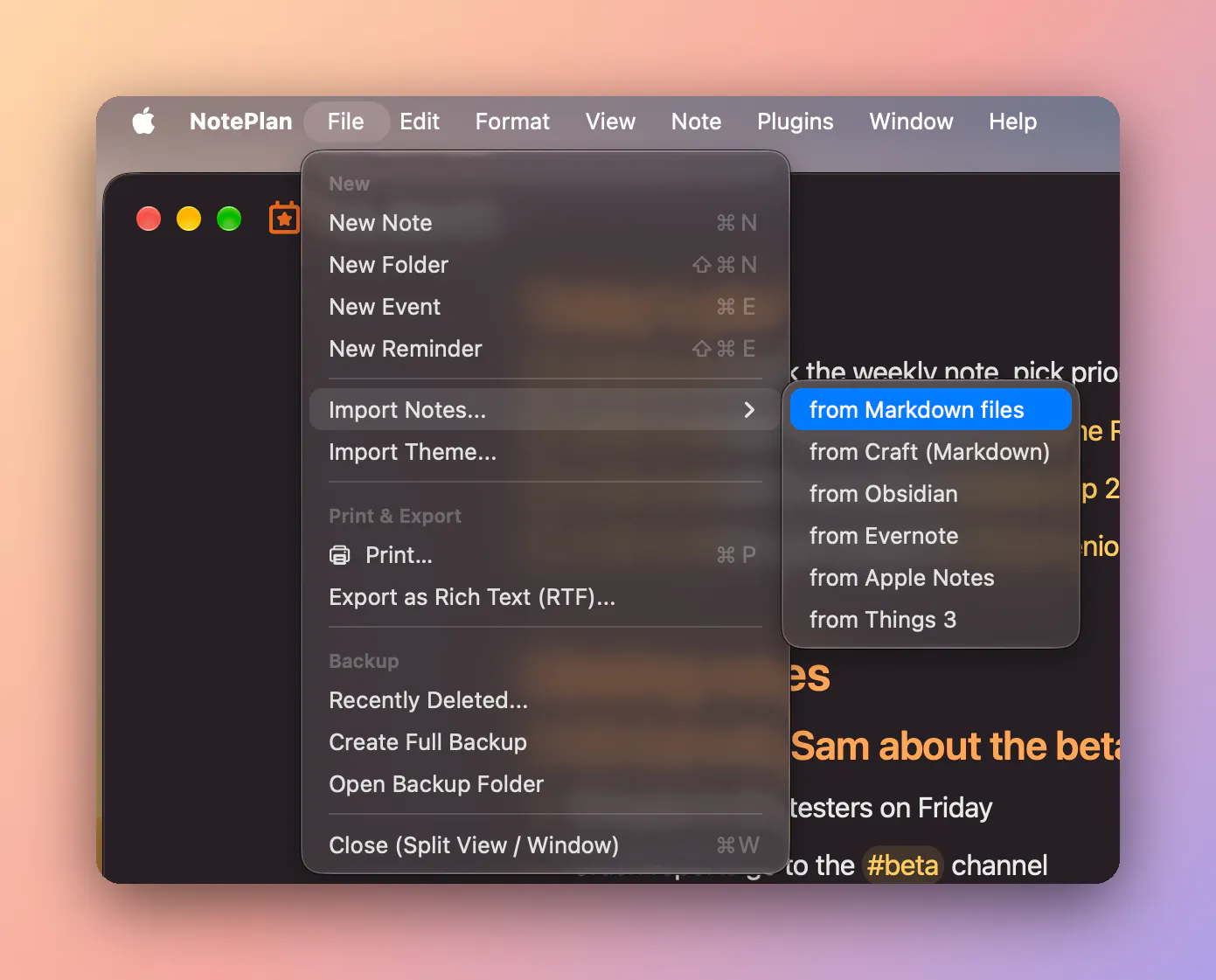
On the Mac, the Markdown importer is in File > Import Notes.
On iPhone and iPad
Go to Settings > Import Notes and choose Markdown Files.
The manual way
You can also copy the Markdown files into NotePlan's folder in Finder. The help article Where are my notes saved? shows how to open that folder.
For regular notes the file extension does not matter. Daily notes are different: to become NotePlan calendar notes, they must be .txt files named in the YYYYMMDD.txt format, for example 20261120.txt. All import options are in the help article How to migrate (import notes) to NotePlan.
What to check after the import
- Titles and text: search for a note you remember and read a paragraph from the middle.
- Folders: check that your notes and the collection indexes are where you expect them.
- Attachments: open a note with an image or a PDF. If a file is missing, look for it in the attachments folder of the export.
- Links between notes: open a collection index and follow a link to one of its notes. NotePlan uses wiki-links and backlinks. If a link from Mem does not open, link the note again with [[Note title]].
- Meetings: open a meeting note and check that the transcript is there.
- export-report.md: if it exists, read it and copy the listed items from Mem by hand while Mem is still open.
Step 3: Bring your AI back
Here is the honest part. NotePlan does not have Mem's built-in chat that knows all your notes. Instead, NotePlan connects to the AI assistant you may already use, such as Claude or ChatGPT, through MCP (Model Context Protocol). The assistant can then search, read and edit your notes and tasks when you ask it to.
There are two connectors, and you can use both at the same time.
Claude and ChatGPT on the Mac (built-in connector)
The connector is part of NotePlan 3.22 and later, so there is nothing extra to install. It needs macOS 12 or later, and notes that sync with CloudKit or are stored locally. It cannot read notes that sync with iCloud Drive.
- In NotePlan, open Help > AI Connectors (MCP).
- Choose your app and follow the button for it (see the list below).
- Claude Desktop: click Install Claude Connector…, then click Install in Claude's dialog.
- Claude Code: click Copy Claude Code Command, paste it into Terminal and press Return.
- ChatGPT or Codex: click Install Codex / ChatGPT Connector…, then Copy Command and Open Terminal. Paste the command, press Return, and restart ChatGPT or Codex.
- Other MCP apps: click Copy MCP Configuration and paste it into the app's MCP settings.
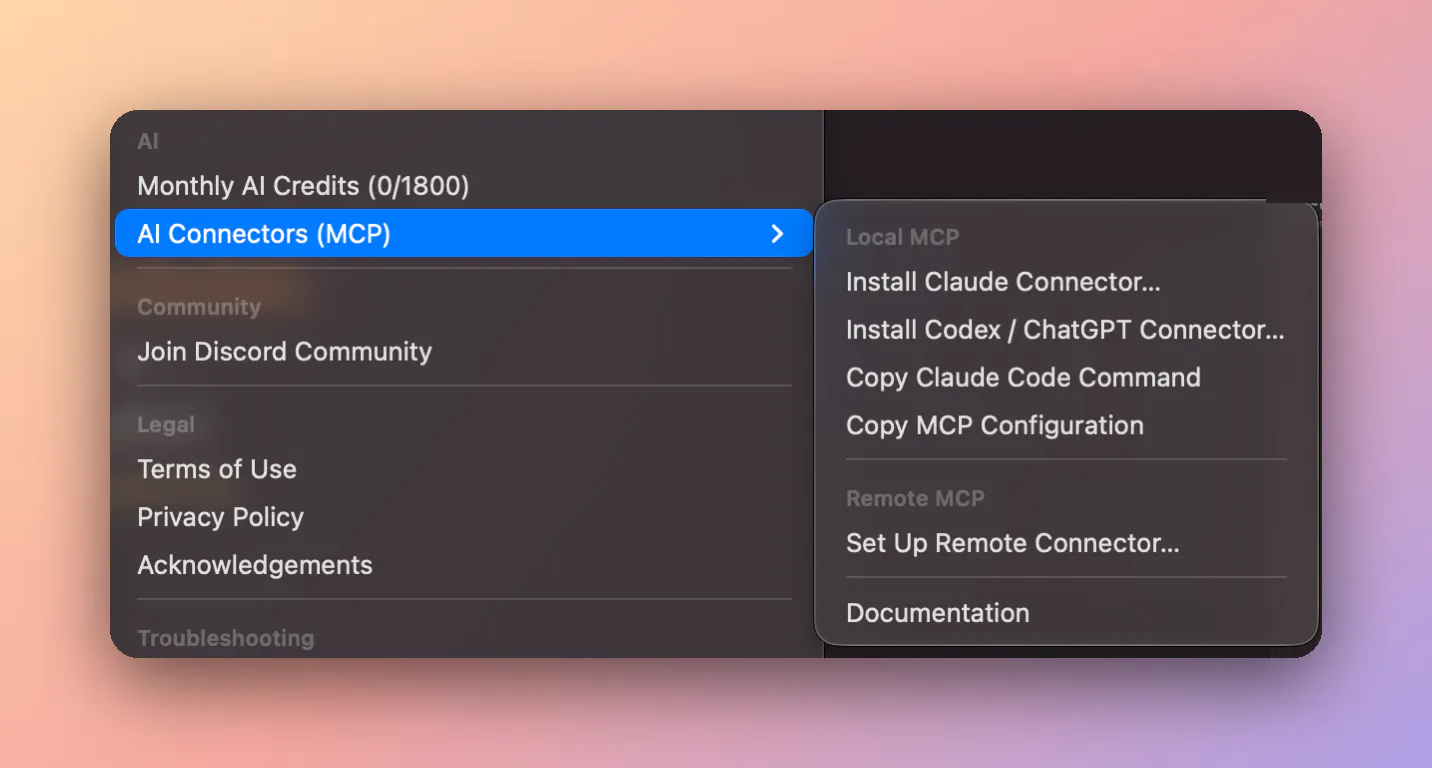
All AI connectors are in Help > AI Connectors (MCP): Claude, Codex and ChatGPT on the Mac, and the remote connector for Claude on iPhone, iPad and the web.
NotePlan can stay closed while the assistant works. Changes apply right away, and trashed notes can be restored from @Trash. All details are in How to install the NotePlan MCP server.
Claude on iPhone, iPad and the web (remote connector)
The remote connector runs on NotePlan's server and reads your notes from iCloud, so your Mac does not need to be on. It works in the Claude app on iPhone and iPad, on claude.ai and in the Claude desktop app.
- In a browser, open claude.ai > Settings > Connectors and click Add custom connector.
- Enter the name NotePlan and the URL https://mcp.noteplan.co/mcp
- Click Connect, then Sign in with Apple with the Apple ID that NotePlan uses.
- On iPhone or iPad, open the Claude app. In a chat, tap the tools button and check that NotePlan is on.
You need CloudKit sync, Advanced Data Protection turned off for your Apple ID, and a Claude plan that supports custom connectors. The same URL also works in other assistants that support remote MCP servers, such as ChatGPT, as a custom connector.
The remote connector can read and search your notes, add, complete and reschedule tasks, and create and move notes. Calendar events, reminders, templates and plugins need the Mac connector. Full steps: Use NotePlan in Claude on iPhone, iPad and the web.
Prompts that replace your Mem habits
- Ask your notes: "Search my notes for the offsite agenda and summarize it."
- Find a decision: "What did I decide about the pricing change? Show me the notes where I wrote about it."
- Prepare a meeting: "Find my last three notes about the website project and list the open questions."
- Capture: "Add a task to my daily note: call the dentist at 3pm."
- Review: "Which tasks did I complete this week in my project folders?"
- Organize: "Find my imported Mem notes about hiring and move them into a folder called Hiring."
Privacy
The Mac connector runs on your Mac and does not upload your notes by itself. Only the note text that the assistant reads goes to its AI provider as part of the chat. The remote connector keeps notes in memory only and never stores them on disk. Details: NotePlan MCP privacy.
NotePlan's own AI features
NotePlan also has AI features in the app, which use OpenAI. On the Mac, select text and press Cmd+O to open Prompt AI. Use it to translate text, summarize a meeting, turn text into bullets or write new text. On iPhone and iPad, you can also transcribe your voice into a note and let AI turn it into a bullet list, a task list or time blocks for your day. See AI features. In the AI settings you can set your own API key or choose another model, for example Claude.
How Mem habits map to NotePlan
Some Mem features have a direct match in NotePlan, some need a connected assistant, and some have no match. This table shows each one honestly.
| Mem feature | In NotePlan | Note |
|---|---|---|
Mem Chat (ask your notes) | Claude or ChatGPT through the MCP connector | Not built in. You use your own AI app and its plan. |
Deep Search (search by meaning) | NotePlan search, or ask the connected assistant | The NotePlan connector has no meaning-based index. The assistant can search with several keywords for you. |
Collections | Folders, tags and backlinks | Mem's collection indexes import as notes with links. |
Heads Up (related notes beside a note) | Backlinks, or ask the assistant for related notes | No automatic suggestions. |
Organizing by Chat | Ask Claude to sort notes into folders | No automatic organizing. Changes apply right away, without a preview. |
Clean Up (tidy a messy note) | Prompt AI (Cmd+O on the Mac) | Select the text and ask AI to fix grammar and format. |
Voice Mode | Voice transcription on iPhone and iPad | Dictate notes, tasks or time blocks into a note. |
Templates | Templates | Recreate the templates you use most. |
What NotePlan adds
Mem was mainly a place to capture and find knowledge. NotePlan adds planning around that knowledge: notes, tasks and your calendar in one place, built around a daily note.
- Daily note: project notes hold the plan, and the daily note holds today's priorities. Weekly, monthly, quarterly and yearly notes help you plan further ahead.
- Tasks in your notes: tasks live inside project and meeting notes, so the plan and its context stay together. Project notes can also show as Kanban boards.
- Calendar and time blocking: Apple Calendar events and Apple Reminders appear beside the daily note, and reminders sync both ways. Drag a task to the timeline to block time for it.
- Plain Markdown files: your notes are Markdown files on your device, synced through your own iCloud. NotePlan works offline, and there is no lock-in. You will not need another export like this one.
- Links and structure: backlinks and wiki-links, templates, plugins, themes and widgets.
- Apple integration: Shortcuts, a URL scheme and a share extension. Shared Spaces for teams.
If you run several projects, our guide How to manage multiple projects shows how project notes and the daily note work together.
Price and platforms
- Price: $99 per year or $12 per month. Free trial: 7 days on the annual plan, 3 days on the monthly plan. One subscription covers all devices. There is no permanent free plan. See the NotePlan pricing page.
- Platforms: native apps for Mac, iPhone and iPad, plus a web version. There are no native Windows or Android apps.
- Recognition: 4.7 out of 5 in the App Store, and featured by Apple as App of the Day.
Who NotePlan is for
- Good fit: professionals who run several projects at the same time, such as managers, founders, consultants, freelancers and team leads; people who plan their day from meeting notes and a calendar; people on Mac, iPhone and iPad who want their notes as plain Markdown files.
- Less suitable: people who want an app that organizes their notes automatically, without asking; students who mainly need lecture notes or handwriting with Apple Pencil; people who need one simple to-do list; teams that need a shared database or wiki for many people; Windows and Android users.
Other Mem alternatives
NotePlan is not the right home for everyone. These apps are also worth a look. Check each vendor's website for current prices.
- Obsidian: local Markdown files and thousands of community plugins. It is free for personal and commercial use, and Sync is an optional paid add-on. Mem has a guide for opening the export as an Obsidian vault.
- Notion: a workspace for docs, databases and teams, with Notion AI for chat, meeting notes and agents. Mem's guide imports notes and collection indexes as Notion pages.
- Reflect: relaunched as Reflect Open, a free and open-source Mac app in beta, with daily notes, backlinks and Markdown files. AI is optional and uses your own API key. The iPhone app is in TestFlight.
- Capacities: organizes notes as connected objects, such as people, books and projects. It has an AI assistant, a free plan, and apps for Mac, Windows, Linux, iOS and Android.
Conclusion
Export your Mem notes now, while you can still read them, and keep the ZIP file. Choose NotePlan if you work on Mac, iPhone and iPad and want your notes, tasks and calendar in one place, with Claude or ChatGPT connected to them. Choose Notion or Capacities if you need Windows or Android or a shared team workspace, and Obsidian if you want a free Markdown app with many plugins.
FAQ
Does Mem export to Markdown?
Yes. The export in Settings > Exports gives you a ZIP file with one Markdown (.md) file per note, a collections folder with index files, and an attachments folder. The export runs on a computer.
Will my links between notes survive?
Mem's help pages do not say how links are written in the export, and Mem suggests that you test a link after the move. In NotePlan, open a collection index and follow a few links. Fix a broken link with a wiki-link to the note title, such as [[Note title]].
Can I use AI with NotePlan?
Yes, in two ways. Connect Claude or ChatGPT through NotePlan's MCP connector to search, summarize and edit your notes and tasks. NotePlan also has Prompt AI and voice transcription built in. It has no built-in chat across all notes like Mem Chat.
Does NotePlan work on Windows?
There is no native Windows or Android app. NotePlan has native apps for Mac, iPhone and iPad, plus a web version.
Is my data private?
NotePlan stores your notes as Markdown files on your device and syncs them through your own iCloud. The Mac MCP connector runs locally, and an AI app sends only the note text that it reads to its provider. See NotePlan MCP privacy for the details.
Can one app really replace your entire productivity stack?
NotePlan did. Try NotePlan free for 7 days to learn how