NewIntroducing Memo AI — Turn voice notes into structured insights→

This release is centered around one big theme: making plugins first-class citizens in NotePlan.
Whether you work on Mac, iPhone, or iPad, extending NotePlan is now faster, easier, and far more integrated into your daily workflow. A redesigned Plugin Browser makes it easy to discover the right plugins on both iOS and Mac, and the ability to pin them to the sidebar gives you instant access, no need to launch them through the Command Bar.
Plugin Browser on iOS and Redesigned on macOS
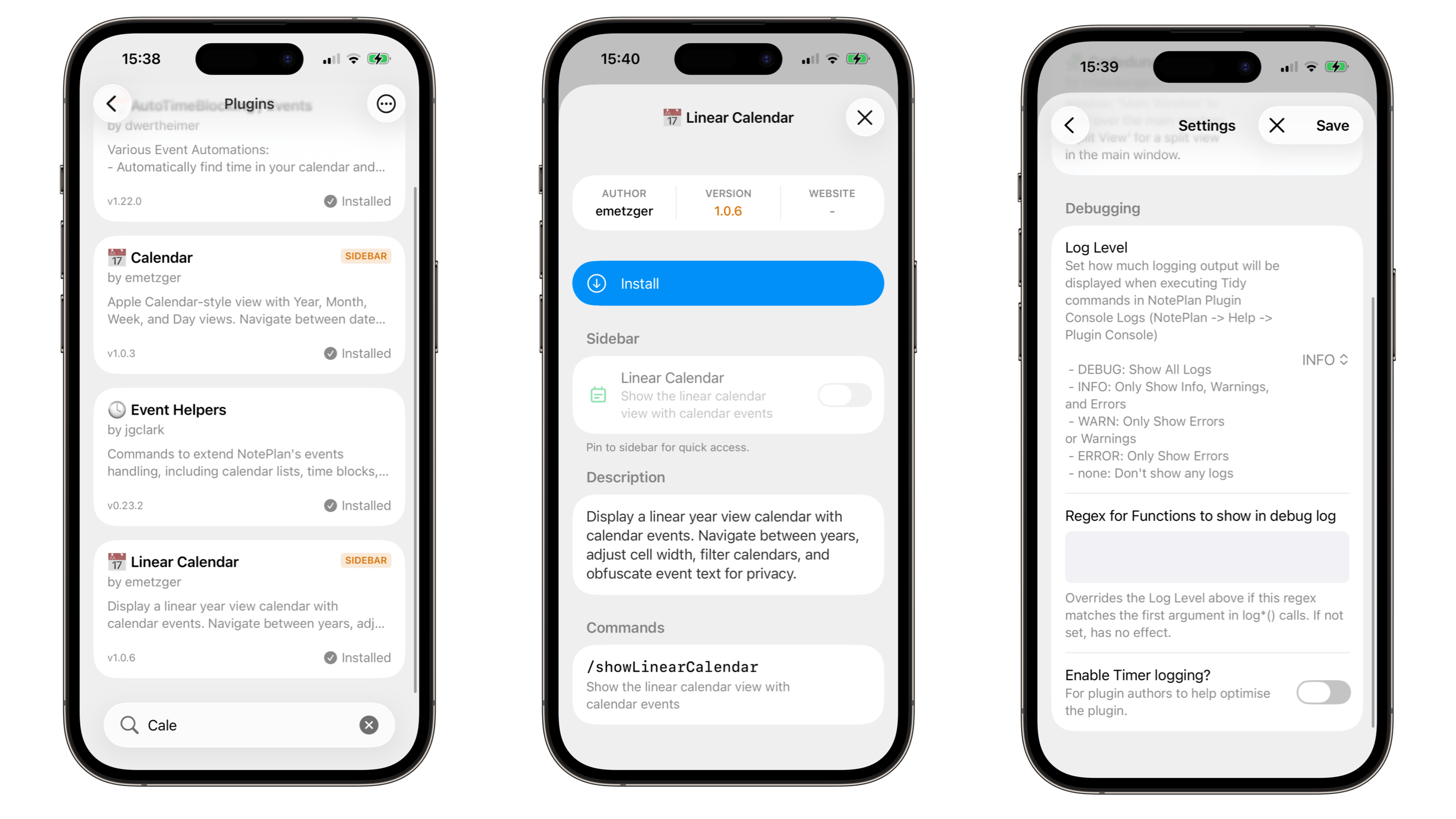
This release focuses on improving how plugins are discovered and used across all platforms.
On iPhone and iPad, plugins can now be installed (Settings > Plugins) and managed directly on the device for the first time. Previously, a Mac was required to install plugins. The new Plugin Browser on iOS allows you to browse, search, install, and update plugins without leaving your device.
On macOS, the Plugin Browser has been redesigned to better match the native System Settings style. The interface is cleaner and more consistent with the rest of the system.
Across iOS and macOS, plugins can now be pinned directly to the sidebar. Pinned plugins remain there after restarts and can be accessed like built-in sections such as Notes or Calendar.
New in this area:
iOS & iPadOS
- Plugin Browser available on iPhone and iPad (Settings → General → Plugins)
- Browse, search, install, and update plugins directly on device
- Plugins auto-pin to the sidebar when installed
- HTML plugins can load in the main view and sidebar
- Sidebar toggle button for plugin views on iPad
macOS
- Redesigned plugin settings UI matching System Settings
- Pin HTML plugins to the sidebar
- Plugins auto-pin to the sidebar when installed
- Command-click a plugin to open it in a standalone window
Opening plugins in standalone windows can be useful for dashboards or reference views that you want visible alongside your notes.
Copy as HTML (iOS & macOS)
You can now export notes as formatted HTML.
On macOS, this option is available in the Edit menu and context menu.
On iOS, it is available in the context menu.
Markdown is converted into properly structured HTML, preserving headings, lists, formatting, and links. This makes it easier to paste notes into emails, Google Docs, and other editors without manual reformatting..
AI Prompt Improvements (CMD+O)
The AI prompt now allows you to quickly add daily notes from a specific year, month, or week to the context.
For example, typing “2025” or “January” will show suggestions that can be inserted into the prompt context.
This makes it easier to generate summaries or work with content from specific time periods.
Fixed & Improvements
This release also includes a range of reliability and usability improvements:
- Added sidebarFolderColorOverride setting (custom themes)
- Fixed checkbox toggling issues (trackpad and empty-area clicking)
- Fixed drawing canvas partial save when opened from Lock Screen widget
- Fixed error dialog appearing on wake from sleep
- Fixed date parsing consuming time when typing “tomorrow”
- Fixed stale task cache affecting note updates
- Fixed adding notes to Spaces folders in Shortcuts
- Numerous plugin stability improvements and crash fixes
- Fixed global Command Bar shortcut not bringing the main window forward (macOS)
- Improved Command Bar behavior in multi-screen setups
These changes improve overall stability and consistency across macOS, iOS, and iPadOS.
---
Enjoying NotePlan? A quick review on the App Store helps support independent development.
Can one app really replace your entire productivity stack?
NotePlan did. Try NotePlan free for 7 days to learn how