NewIntroducing Memo AI — Turn voice notes into structured insights→
Top 6 Journaling Apps for Mac
Discover the best journaling apps for Mac, from NotePlan to Bear. Compare features, pricing, and find your perfect digital diary.
Are you looking to start a digital journaling habit or upgrade your current note-taking system? You're in luck. Whether you're a Mac user seeking the perfect desktop journaling companion or an iPhone enthusiast hunting for the best app for notes, this guide has you covered.
In this article, I’m excited to share with you my findings on six outstanding journaling apps for Mac. These apps are available on the Mac App Store, emphasizing their reliability and continuous updates. Whether you’re a desktop enthusiast or an iPhone user searching for the best app for notes, I’ve got you covered.
From the versatile NotePlan to the elegantly simple Bear, I'll walk you through the features, pricing, and unique selling points of each app. Join me as we dive into the world of digital journaling and discover how these powerful tools can transform the way you capture and organize your thoughts.
What Makes a Great Journaling App
A great journaling app is more than just a digital notebook; it’s a tool that enhances your journaling habit and makes it easier to capture your thoughts and experiences. The best journaling apps for Mac should offer a clean and user-friendly interface, making it simple to create and manage journal entries. Robust syncing and backup options are crucial to ensure your journal entries are safe and accessible across multiple devices.
Benefits of Journaling
Journaling is a powerful practice with numerous benefits that can positively impact various aspects of your life. Here are some of the key advantages of maintaining a regular journaling habit:
- Improved Mental Health: Journaling can help reduce stress and anxiety by providing a safe space to express your thoughts and feelings. It can also improve overall mental well-being by helping you process emotions and gain clarity.
- Increased Self-Awareness: By regularly writing about your thoughts and experiences, you can gain a deeper understanding of yourself, your motivations, and your patterns of behavior.
- Better Problem-Solving Skills: Journaling can help you clarify your thoughts and identify solutions to problems. Writing about challenges can provide new perspectives and insights.
- Improved Creativity: Journaling can stimulate your creativity and inspire new ideas. The act of writing can help you explore different viewpoints and think outside the box.
- Enhanced Reflection and Introspection: Journaling encourages reflection on your experiences, helping you gain valuable insights and learn from past events.
- Improved Writing Skills: Regular journaling can help you develop your writing skills and improve your communication. The more you write, the more you refine your ability to express yourself clearly and effectively.
- Increased Gratitude: Journaling can help you focus on the positive aspects of your life and cultivate a sense of gratitude. Writing about things you are thankful for can boost your mood and overall outlook.
- Better Goal-Setting: Journaling can help you set and achieve goals by providing a space to outline your objectives and track your progress. Writing about your goals can keep you accountable and motivated.
By incorporating journaling into your daily routine, you can experience these benefits and more, leading to a more reflective, creative, and fulfilling life.
Best journaling apps at a glance
Many of these apps offer a free app version with essential features, with options to upgrade for more advanced functionalities.
| App Name | Key Features | Pricing |
|---|---|---|
Calendar integration, Task management, Markdown support | $9.99/month (7-day free trial) | |
End-to-end encryption, Photo/video integration, "On This Day" feature | $34.99/year (30-day free trial) | |
Multimedia entries, Social media integration, Cloud sync options | $9.99 one-time purchase (Free plan available) | |
Grid-based interface, Customizable templates, Cross-platform support | $2.99/month (Free plan available) | |
Cross-platform, Google Drive integration, Mood tracking | $50/year (Free plan available) | |
End-to-end encryption, Markdown support, iCloud integration | $20.99/year (Free plan available) | |
Markdown support, Cross-device sync, Tag-based organization | $2.99/month or $14.99/year (Free version available) |
NotePlan: A Comprehensive Journaling App
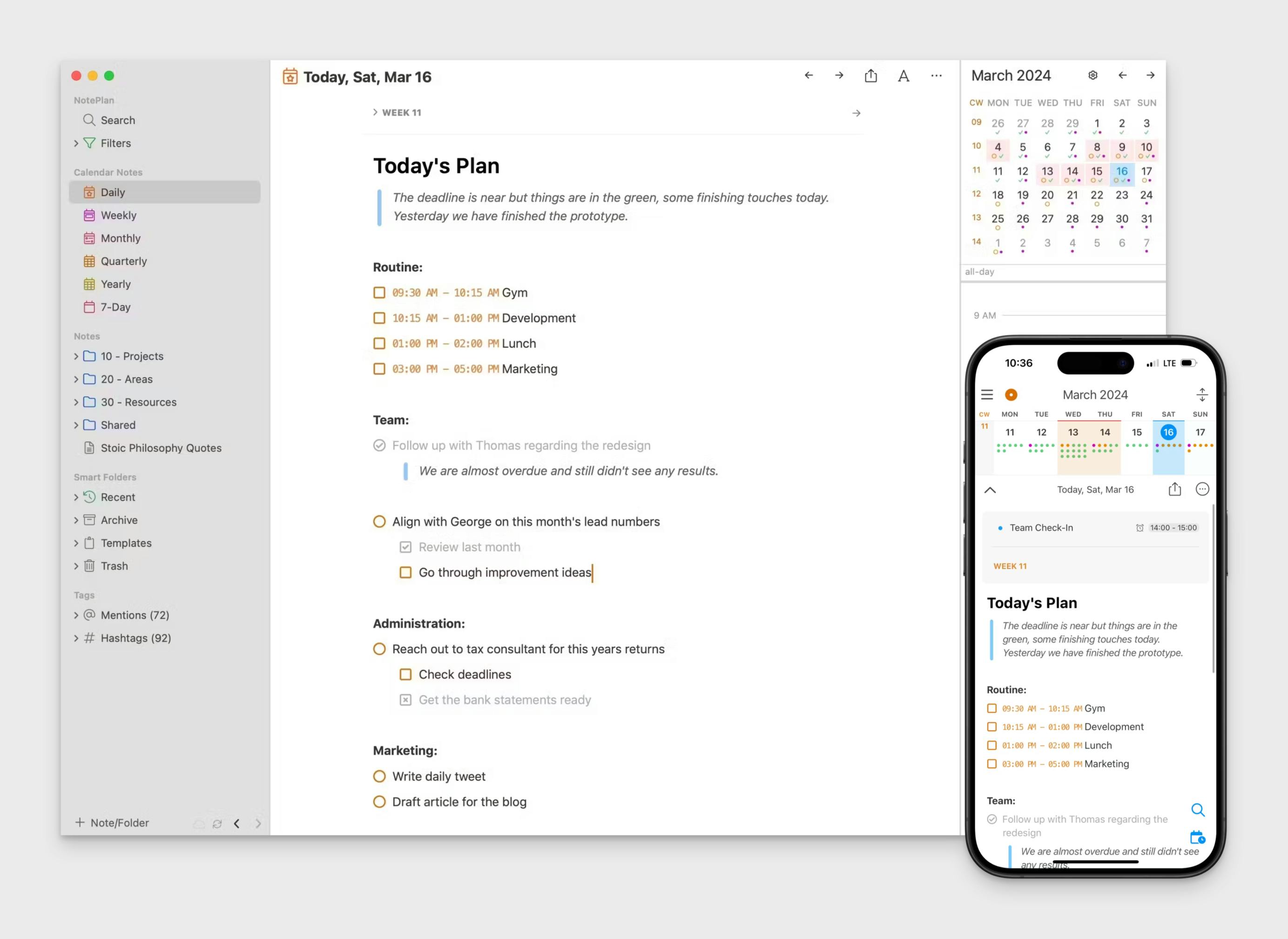
- Pricing: 7 day free trial. Paid plan starting with $9.99/month
- App Store Rating: 4.8 out of 5
Imagine having a digital sanctuary for your thoughts, ideas, and daily musings, all within your Mac.
NotePlan isn't just another note-taking app; it's your personal journaling haven, seamlessly blending your calendar, tasks, and notes into one cohesive space.
Picture effortlessly weaving your to-dos amidst your reflections, capturing fleeting thoughts alongside scheduled appointments, and watching your productivity blossom.
With NotePlan, you can chronicle your day, track your progress towards goals, and unlock a deeper level of self-awareness, all while staying organized. NotePlan offers a completely private digital space for users to record their personal experiences securely.
Embrace the freedom of Markdown formatting, link related entries, and effortlessly search your entire journal. It's time to elevate your journaling experience with NotePlan, your all-in-one companion for reflection, planning, and mindful living on your Mac.
Here's how NotePlan elevates your journaling experience:
- A Journal for Every Day: Start each morning with a fresh digital page. NotePlan automatically creates daily notes, so you can effortlessly capture your thoughts, to-dos, and reflections as they come.
- Markdown Made Easy: No clunky interfaces or complicated formatting. NotePlan embraces the simplicity of Markdown, allowing your words to flow freely. Bold your breakthroughs, italicize your insights, and create lists to organize your musings.
- Beyond the Daily Grind: NotePlan isn't just for daily entries. Craft weekly reviews, monthly reflections, or even long-form journal entries for significant life events. It's your digital canvas for self-expression.
- Tag, Search, and Rediscover: Remember that brilliant idea you jotted down weeks ago? With NotePlan's powerful tagging and search functionality, you can instantly rediscover past entries and connect the dots between your thoughts.
More than just a journaling app, NotePlan is a productivity powerhouse:
- Task Management: Transform your reflections into action. Seamlessly create tasks within your journal entries and track your progress.
- Calendar Integration: View your schedule alongside your journal entries, ensuring your reflections inform your daily life.
- Cross-Device Sync: Access your journal entries from your iPhone or iPad, ensuring your thoughts are always within reach.
Day One: Easily create journal entries
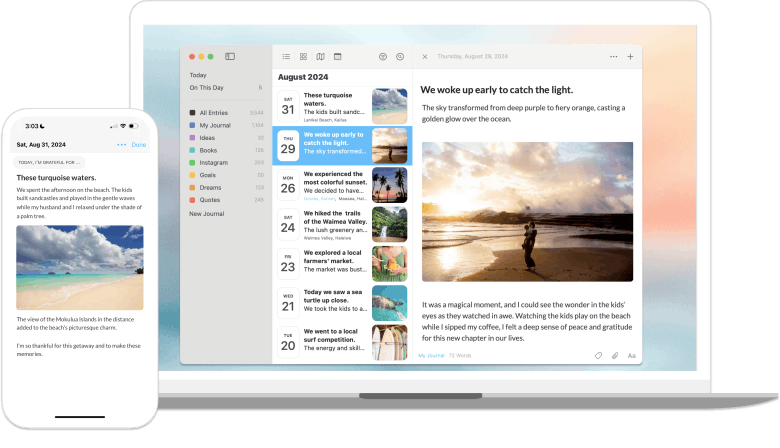
- Pricing: 30 day free trial. Paid plan starting with $34.99/annually
- App Store Rating: 4.8 out of 5
Day One for Mac offers a clean and organized space to record your thoughts, memories, and experiences.
It provides a streamlined writing environment with features like markdown support, photo and video integration, and location tagging. You can easily organize entries with journals and tags, and revisit past moments with the “On This Day” feature. Users can also use the Apple Watch app to dictate journal entries and record audio snippets on the go.
Day One prioritizes privacy with end-to-end encryption and passcode protection. Though it offers a free plan with basic features, a premium subscription unlocks additional functionality such as unlimited photos and videos, cloud sync across devices, and more.
Pros of Day One:
- A clean and user-friendly interface that is easy to navigate.
- Offers strong encryption and security features to protect your privacy.
- Available across various Apple devices with seamless syncing capabilities.
- Allows for a variety of media in entries, including photos, videos, and audio recordings.
- Provides useful prompts and templates to inspire writing.
- Includes features like "On This Day" to resurface past entries.
Cons of Day One:
- Limited customization options compared to some other apps.
- No collaborative features for shared journaling.
- Lacks a full-featured web version for browser access
- Limited task management features compared to apps like NotePlan
- Relies heavily on cloud services; limited offline functionality
Diarium
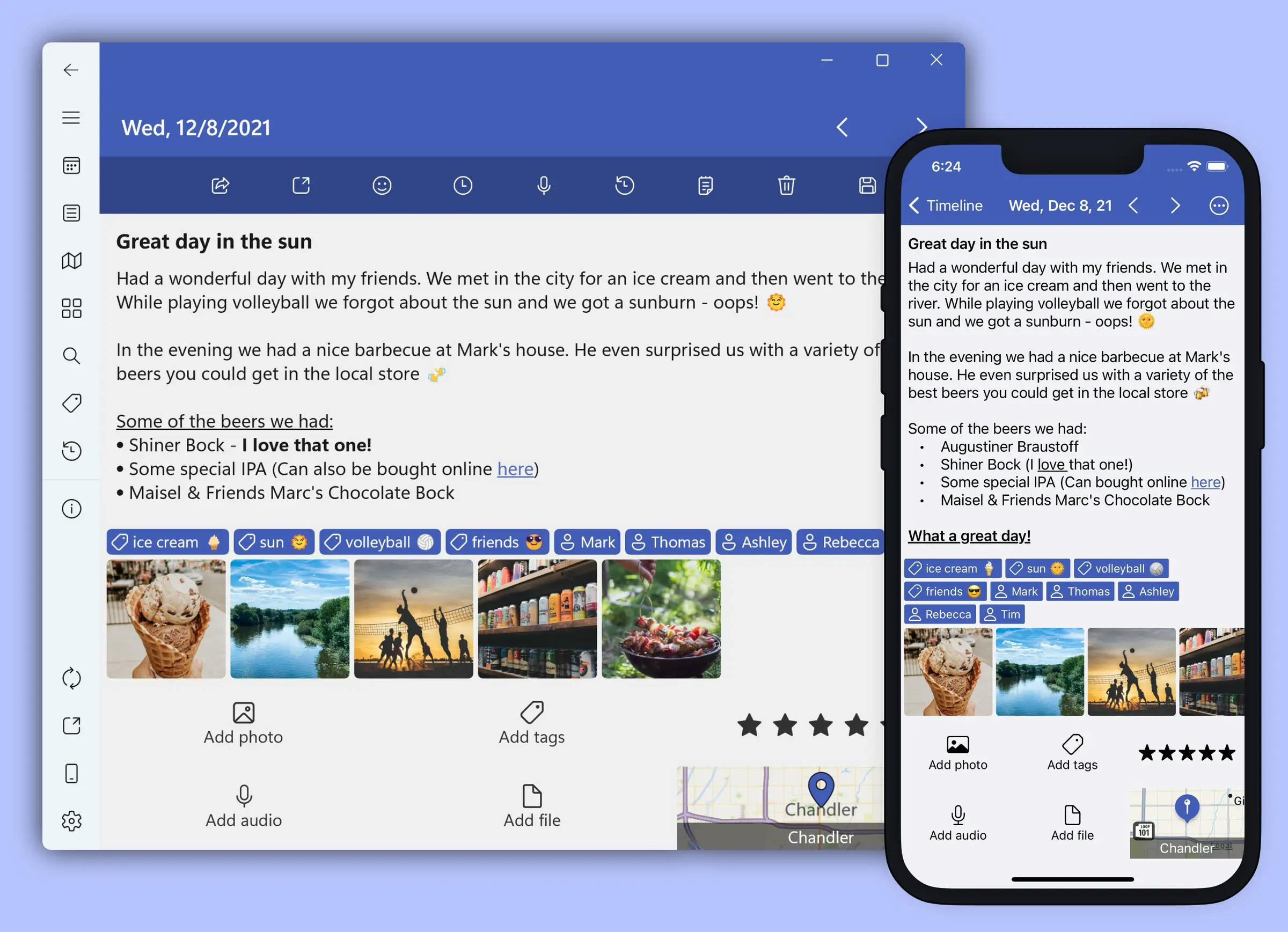
- Pricing: Free Plan. Paid plan starting with $9.99 one time purchase
- App Store Rating: 4.8 out of 5
Diarium for Mac provides a platform for journaling with a focus on flexibility and diverse content.
You can incorporate text, photos, videos, audio recordings, and even weather information into your entries. It supports markdown formatting and allows you to track moods and activities. Users can easily add multiple photos to their journal entries, organizing them into visually appealing grids to enhance the overall journaling experience.
Diarium emphasizes user control over data with local storage and optional cloud sync using personal accounts like OneDrive or Google Drive.
While the free version offers core features, a one-time purchase unlocks extras like unlimited attachments, cloud sync, and app connectivity.
Pros of Diarium
- Supports multimedia entries, allowing addition of photos, videos, and audio recordings
- Offers automatic synchronization across devices via popular cloud services
- Integrates with social media and other apps to import activities and data
- Provides daily reminders to encourage consistent journaling habits
- Features tagging and categorization for better organization of entries
- Includes statistics and insights to track journaling patterns and progress
- Allows password protection for enhanced privacy and security
- Supports exporting entries to formats like Word, PDF, and Markdown
- User-friendly interface with a clean and intuitive design
- Offers customizable themes and fonts for personalized appearance
Cons of Diarium
- May lack deep integration with the macOS ecosystem and native features
- Does not offer end-to-end encryption like some competitors (e.g., NotePlan, Day One)
- Limited customization options for templates and journaling prompts
- Synchronization relies on third-party cloud services, which might raise privacy concerns
- Fewer community resources and less extensive user support
- May not support advanced formatting options beyond basic Markdown
- No web version available for accessing journals from a browser
- Lacks integration with certain Apple services like iCloud or Apple Health
Grid Diary: Manage Multiple Journals

- Pricing: Free Plan. Paid plan starting with $2.99/month
- App Store Rating: 4.1 out of 5
Grid Diary for Mac offers a structured approach to journaling with its unique grid-based interface.
You can choose from various pre-designed templates or customize your own to focus on specific aspects of your day, like gratitude, goals, or mood. The app encourages reflection and introspection through prompts and questions within each grid section.
Creating a new entry is simple and efficient, with options to integrate photos and utilize journaling prompts. Grid Diary allows for basic text formatting and image integration. While the free version provides core functionality and limited templates, a subscription unlocks additional templates, customization options, and cloud sync across devices.
Pros of Grid Diary:
- Simple and structured layout using a grid format for easy organization of thoughts.
- Customizable templates with pre-made questions to guide journaling.
- Flexible prompts that can be tailored to personal needs or goals.
- Cross-platform support with seamless syncing between Mac, iPhone, and iPad.
- Privacy features with passcode protection and end-to-end encryption.
- Daily, weekly, and monthly views to track journaling habits and progress.
- Easy to export entries for backups or other uses in different formats.
- Encourages consistency through visually appealing, grid-based entries.
Cons of Grid Diary:
- Limited customization of interface design compared to apps like NotePlan, Day One or Journey.
- No rich text formatting or multimedia integration within journal entries.
- Lacks advanced features like calendar view or task management found in other apps.
- Less robust for integrating with third-party apps or services for more extensive workflows.
- The structure may feel restrictive to users who prefer free-form journaling styles.
- Fewer collaboration or sharing options compared to other apps.
Journey: Completely private digital space
- Pricing: Free Plan. Paid plan starting with $50/annually
- App Store Rating: 4.8 out of 5
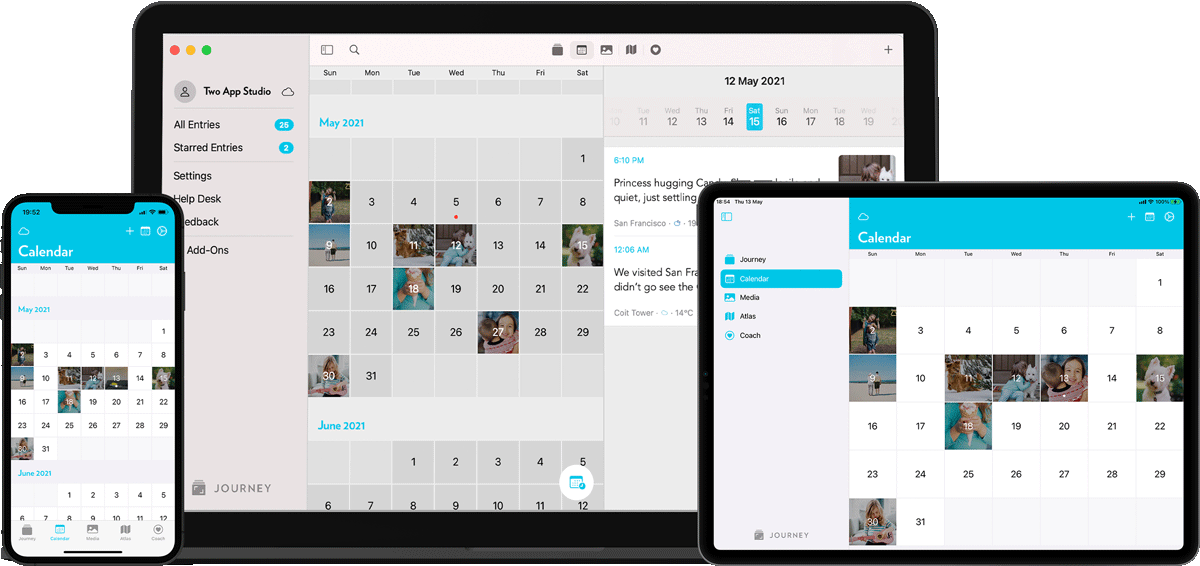
Journey for Mac presents a minimalist and distraction-free environment for journaling.
You can express yourself through text, images, and audio recordings, organizing entries with tags and a calendar view. It offers features like cloud sync, markdown support, and a "Throwback" function to revisit past entries.
Journey emphasizes accessibility with cross-platform compatibility and a web version for browser-based journaling. It offers a seamless online journaling experience with cross-platform compatibility and cloud sync. While a free version is available, a paid plan unlocks features like unlimited photos and cloud storage, along with integration with Google Drive.
Pros of Journey:
- Cross-platform support with seamless syncing across Mac, iPhone, iPad, Android, and Web.
- Integration with Google Drive for secure backup and storage of entries.
- Clean and minimalist design that promotes distraction-free writing.
- Supports multimedia journaling, including photos, videos, and audio recordings.
- Built-in mood tracker to help monitor emotional well-being over time.
- Provides daily prompts for inspiration and encouragement to write consistently.
- Calendar view for easy navigation through past entries and tracking journaling habits.
- Ability to export entries in various formats for backups or sharing.
- Built-in reminders to help maintain journaling routines.
Cons of Journey:
- Limited customization in formatting and layout compared to more flexible journaling apps.
- Lacks deep task management or integration with productivity tools.
- The interface may feel too minimal for users seeking more advanced journaling features.
- Does not offer end-to-end encryption for privacy-conscious users.
- Less flexibility in creating personalized templates compared to other apps like Grid Diary.
- The search function is not as advanced as competitors, making it harder to find specific entries over time.
Diarly
- Pricing: Free Plan. Paid plan starting with $20.99/year
- App Store Rating: 4.8 out of 5
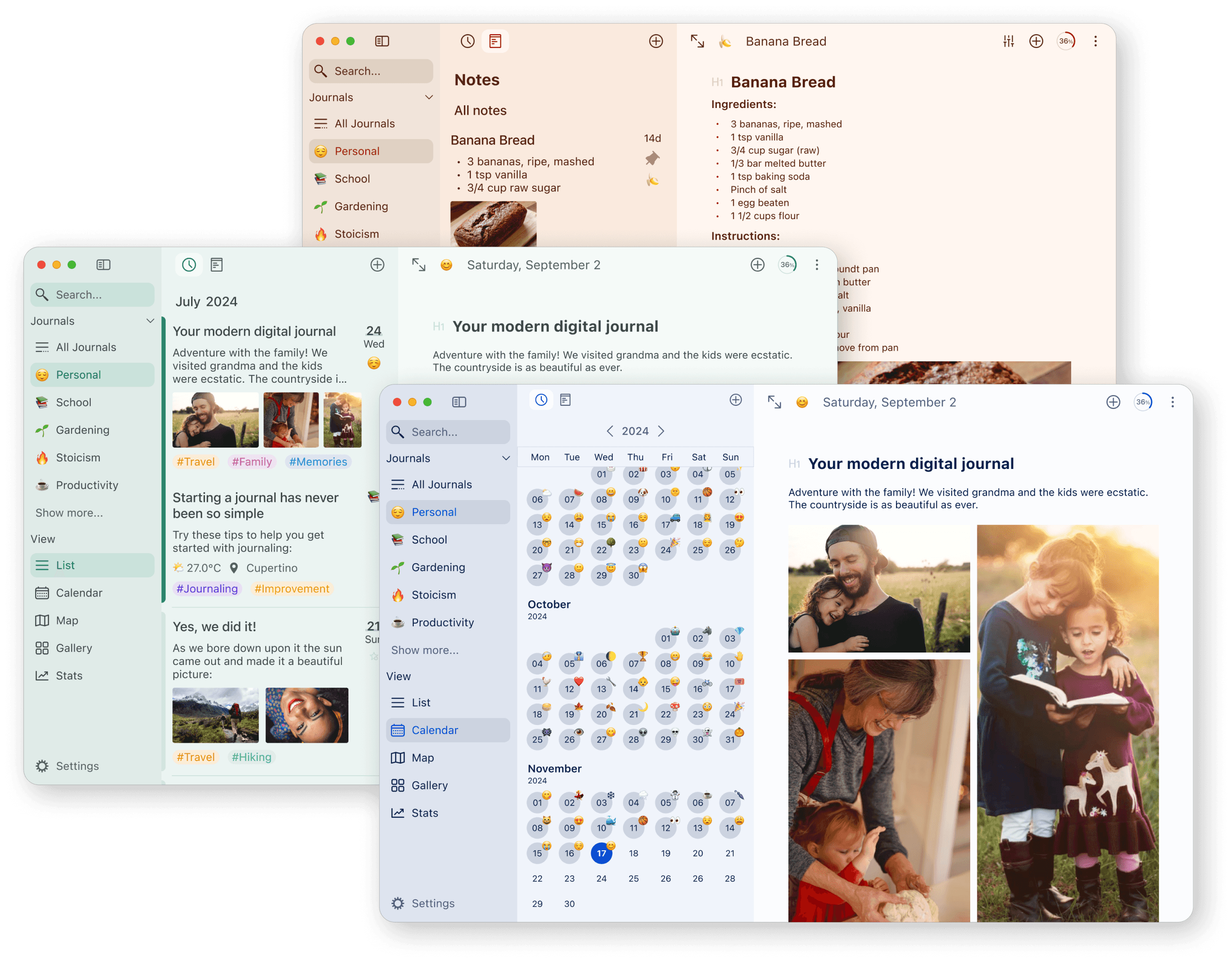
Diarly for Mac offers a focused writing experience with a minimalist interface and distraction-free mode.
You can capture your thoughts and memories using text, images, and audio recordings. It supports markdown formatting and integrates with other apps like Apple Health and Calendar. Diarly combines traditional journaling with modern technology, offering a comprehensive digital journal experience.
Diarly prioritizes privacy with end-to-end encryption and offers cloud sync across Apple devices. A free trial lets you explore core features, while a subscription unlocks unlimited journals, advanced statistics, and customization options.
Pros of Diarly:
- Lightweight and fast app optimized for a smooth writing experience on Mac.
- Built-in end-to-end encryption for enhanced privacy and security of entries.
- Offers advanced markdown support for text formatting and customization.
- Supports multimedia journaling with the ability to add photos, drawings, and sketches.
- Extensive customization options including themes, fonts, and colors for a personalized interface.
- Provides an automatic daily prompt feature to encourage regular writing.
- Easy-to-use tagging and organization system for managing entries by topics or themes.
- Offers seamless integration with iCloud for backup and syncing across devices.
- Focused writing mode for a distraction-free journaling experience.
Cons of Diarly:
- Lacks integration with third-party apps or services for extending journaling workflows.
- No cross-platform support outside the Apple ecosystem, limiting use to Mac and iOS.
- Fewer pre-made templates or guided prompts compared to apps like NotePlan, Grid Diary or Journey.
- Does not offer a calendar view for tracking journaling frequency or viewing past entries at a glance.
- Limited multimedia capabilities compared to other apps that support audio and video entries.
Bear
- Pricing: Free Plan. Paid plan starting with $2.99/month
- App Store Rating: 4.7 out of 5
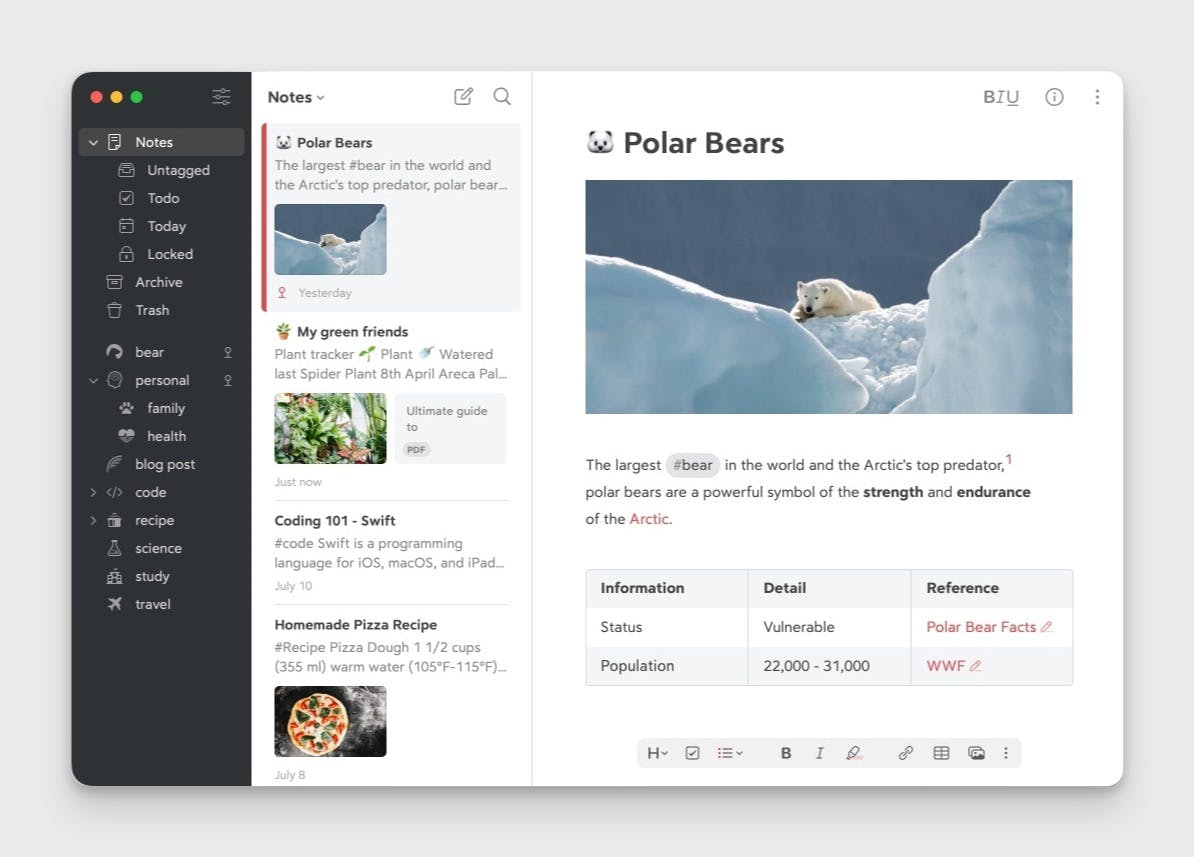
Bear for Mac offers a streamlined writing experience with a focus on simplicity and organization.
You can use it to jot down quick notes, draft longer pieces, or keep a daily journal. It features a clean interface with markdown support, cross-note linking, and a powerful organization system using hashtags.
While Bear excels as a notes app, its flexible features make it suitable for structured journaling as well. You can add images, sketches, and even code blocks to your entries.
It offers a free tier with basic features, while a Pro subscription unlocks cross-device syncing, advanced export options, and more.
Pros of Bear:
- Beautiful and minimalist design with a clean interface optimized for Mac users.
- Supports Markdown for quick and easy text formatting.
- Flexible note organization using tags, allowing users to easily categorize journal entries.
- Cross-platform syncing through iCloud, ensuring access across Mac, iPhone, and iPad.
- Offers advanced text editing features, including code blocks, rich links, and to-dos.
- Supports multimedia journaling with the ability to embed images, files, and links within entries.
- Powerful search function to quickly find entries based on keywords or tags.
- Customizable themes and typography for a personalized writing environment.
- Export options in multiple formats, including PDF, HTML, and Markdown.
Cons of Bear:
- Lacks built-in journaling prompts or templates, making it less structured for regular journaling habits.
- No built-in calendar view or specific features tailored to tracking journaling frequency.
- Does not offer end-to-end encryption for users prioritizing maximum privacy for their journal entries.
- No multimedia support for audio or video journaling, limiting the richness of entries.
- Limited integration with third-party apps and services compared to other journaling-focused apps.
- The tag-based organization system may feel overwhelming for users preferring folder-based or simpler methods.
Choosing the Best Journaling App for Your Needs
Selecting the right journaling app can significantly enhance your journaling experience. Here are some factors to consider when choosing the best journaling app for your needs:
- Ease of Use: Look for an app that is easy to use and navigate, with a clean and intuitive interface. The simpler it is to create and manage journal entries, the more likely you are to maintain a consistent journaling habit.
- Features: Consider the features that are important to you, such as the ability to create multiple journals, native app functionality, health app integration, and journaling suggestions. These features can enhance your journaling experience and make it more enjoyable.
- Syncing and Backup: Ensure the app has robust syncing and backup options, so your journal entries are safe and accessible across multiple devices. This is crucial for protecting your data and ensuring you can journal from anywhere.
- Security and Privacy: Choose an app with strong security and privacy features, such as end-to-end encryption and a lock screen. This ensures your journal entries remain private and secure.
- Compatibility: Make sure the app is compatible with your device, whether it’s an iPhone, iPad, or Mac. Compatibility ensures a seamless and integrated journaling experience.
- Reviews and Ratings: Read reviews and check the ratings of the app to get an idea of its performance and user satisfaction. This can provide valuable insights into the app’s reliability and functionality.
- Free Trial or Version: Look for an app that offers a free trial or version, allowing you to try it out before committing to a paid subscription. This ensures the app meets your needs and preferences.
- Customer Support: Consider an app with good customer support, such as email support, FAQs, and user guides. Reliable customer support can help you resolve any issues and make the most of the app’s features.
Conclusion
As we've explored these six powerful journaling apps for Mac, you've seen how each offers unique features to enhance your digital note-taking and reflection process.
Remember, the best app for notes on your iPhone or Mac is the one that fits seamlessly into your lifestyle and encourages consistent use.
Don't let another day pass without capturing your thoughts, ideas, and experiences. Choose the app that resonates with you and take the first step towards a more organized, reflective, and productive digital life. Your future self will thank you for the wealth of insights and memories you're about to create.
By considering the factors mentioned before, you can choose a journaling app that fits seamlessly into your lifestyle and enhances your journaling habit. Happy journaling!
Can one app really replace your entire productivity stack?
NotePlan did. Try NotePlan free for 7 days to learn how