NewIntroducing Memo AI — Turn voice notes into structured insights→

We've been working on something new: Memo AI — an AI-native voice note taking app for iPhone.
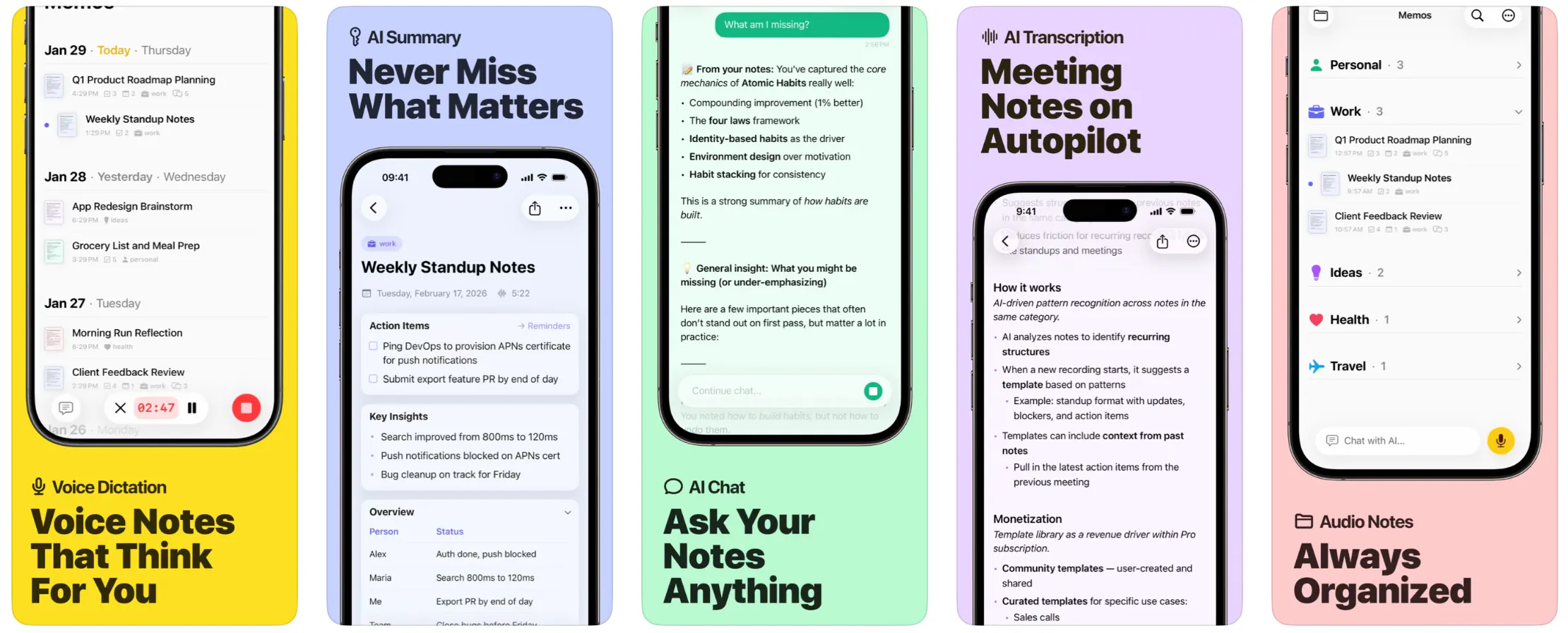
Hit record, talk, and Memo does the rest. It self-organizes your recording into a structured note with:
- Key insights and an overview
- Action items and deadlines, exportable to Reminders
- The full original transcription, always kept
- An AI chat that can answer questions across all your notes
How to use it?
Use Memo for meetings, doctor visits, lawyer appointments, lectures, interviews, journaling on your commute, or just ideas on a walk. Anywhere you'd normally try to remember something — or scramble to take notes — Memo captures it for you. When you're done, export as PDF or Markdown, or send the note straight into NotePlan.
Memo works anywhere your iPhone can hear voices, so in-person meetings are the natural fit. For video calls on your Mac or PC, just put the call on loudspeaker and let your iPhone listen in.
The real power shows up after the recording. Memo takes in everything you said, pulls out the structure, and turns it into a clean note with a summary, key insights, and action items. From there, the AI chat lets you ask follow-up questions across your notes — and as you chat, Memo quietly builds up Memories about you, so future answers get sharper over time.
Privacy
No account, no sign-up, no sync. Everything stays on your iPhone — your notes, transcripts, chat history, and the Memories the AI builds up about you. We don't operate servers for user data, so there's nothing to breach on our end.
The only time anything leaves your device is for AI processing. Audio goes to Groq (our transcription provider) over an encrypted connection, gets turned into text, and the audio is deleted immediately — both on your device and on Groq's side, which doesn't retain anything after processing. Text processing, summaries, and chat go through OpenAI. None of these providers use your data to train their models.
If you'd like to keep your recordings around to play back later, you can turn that on in settings. The audio stays entirely on your device — it's never uploaded anywhere — and you can delete any recording at any time.
European users can switch to Mistral in settings, a French provider that keeps all AI processing inside the EU.
A few other things worth mentioning:
- We don't use analytics SDKs or behavioral tracking.
- We don't collect your name, email, or any identifiers — we literally don't know who you are.
- Your data is never sold, shared, or used for advertising.
- Uninstall the app and everything is gone. That's the whole deletion process.
Full details on our privacy page.
Platforms
iPhone only for now — we wanted to keep things simple and get one platform right before expanding. The iPhone was the natural starting point: it goes everywhere with you, and recording is one tap away.
Mac and iPad are on the radar, but adding them means adding sync — and sync is one of the hardest parts of any app to get right. When it breaks, it breaks loudly, so we'd rather ship it properly than ship it fast.
FAQ
- Will it be available on Setapp? → No, it's an App Store exclusive.
- Can I purchase it from your website? → No, for simplicity, we rely on the App Store for payments.
- Does it work with NotePlan? → Yes, you can send notes directly into NotePlan (manually or automatically).
- Will there be a Mac and iPad version? → We are strongly considering it. We wanted to start with a lean app on iPhone, to keep things simple. Cross-platform requires sync and sync is hard.
- I'm on TestFlight, can I continue testing? → Yes, but you need to download once the App Store version and start a subscription at some point. The TestFlight version won't stay free forever.
Can one app really replace your entire productivity stack?
NotePlan did. Try NotePlan free for 7 days to learn how